Known limitations
Caller Karaoke is usable on desktop and in the browser, but 0.1.0 is still a development release. These are the limitations to know before relying on it.
Platforms
- Android is configured and buildable with minSdk 26, but real-device audio
and TTS testing is incomplete. The APK includes the
rs.tts.BridgeJNI class; a barecargo apk builddoes not, and will crash while loading the native library. Release APKs use the debug keystore unless release signing secrets are configured. - iOS and macOS have no release build. On an iPhone or iPad, the download button on this site opens the hosted browser app, with the browser build's limits below. macOS visitors can use the hosted browser app too.
- The web build needs the included proxy for online search and downloads. Without it, the bundled defaults and anything already in your saved library still work.
- There is no stable signed release. release artifacts use version 0.1.0, may be replaced, and are not code-signed.
- Flatpak is a source-tree packaging path, not a release artifact yet.
Features
- SoundFont loading is desktop-only; the browser and Android builds play the bundled Fluid R3 GM subset.
- MIDI export is desktop-only; the browser and Android builds report that it is unavailable. General MIDI has fifteen non-drum channels, so a band with more than fifteen pitched players exports its first fifteen players; the rest still play in the app.
- A SoundFont you load is your responsibility, including its license. The
bundled subset is MIT licensed and credited in
CREDITS.md. - TTS uses the local Kokoro neural voice on desktop and Android. The model and selected voice are downloaded on first use and then cached; a first run without a network connection falls back to the platform voice. Web always uses the platform voice. On Android, the neural runtime is packaged in the APK, which makes the APK larger; a build made without it uses the platform voice. Visual calls continue if no voice is available. The session Caller slider applies to the caller mixed into the app's audio engine when the neural voice is active; the platform fallback voice follows the device's media volume.
- ContraDB page size is fixed at ten results; there is no page-size selector. The Caller's Box has no paging at all: one search returns at most 50 matches, and a larger result must be narrowed by title, author, or figure text.
- Folders are a flat list. There are no nested folders and no sync between devices.
- There is no offline “using cached search results” banner; stale cache is used silently. The saved-dance and saved-tune lists always work offline.
- There is no cache-size or library-size display, and no manual source refresh; clearing the cache and downloading an item again are the maintenance actions.
- The first Play may wait for the background render if it has not finished. There is no progress bar or cancel control while it runs. Desktop and Android render on a worker thread so the window stays responsive; the web build renders on the press and can pause briefly.
- A minimized window keeps playing and calling, but the desktop throttles a hidden window's frames to about one every 100 ms, so a call can begin up to a tenth of a second after its beat. The lead's safety padding covers that delay; no call is skipped and the order never changes.
- Cycle tunes renders the next tune during the current tune's last time through on desktop and Android. The web build has no render worker and prepares the next tune at the change, which can pause briefly.
- Share links are a web-build feature. A link carries the dance and the ordered tune set in its URL fragment, so it can be long; a chat app may shorten or refuse one. A link holds at most 100 tunes.
- File transfer uses each platform's own mechanism. Desktop saves through a
native dialog and the browser downloads a file or opens a file input. Android
writes exports to the app's private export folder and offers the system share
sheet; on Android 10 and newer the shared copy is a
content://Downloads URI, while Android 8 and 9 share the text only because those releases have no Downloads collection. There is no drag-and-drop target and no file manager browser inside the app. - Import reads local files only. It does not fetch a URL, and it does not merge a multi-tune ABC file: only the first tune is imported and the status line reports the rest.
- The ABC editor is a plain text area. It has no syntax highlighting, line numbers, transpose control, part splitter, or edit history beyond the text field's own undo. It changes the ABC text only; title, composer, key, meter, and source are not re-read from the edited headers.
Dance cards
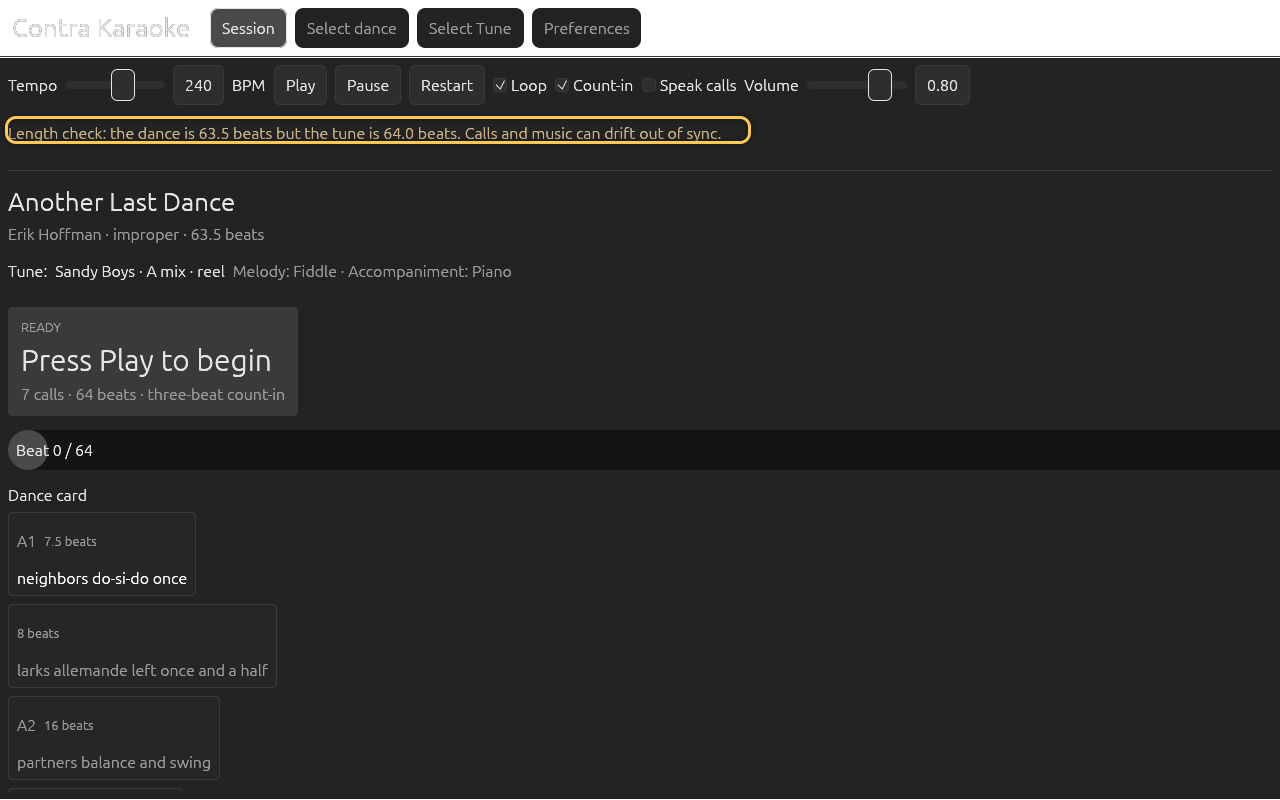
The transport uses one 64-beat music loop. A card shorter than 64 beats leaves music playing after its last call. A card longer than 64 beats is not fully reached in 0.1.0 because the playhead resets at the loop boundary. The session shows a length check warning when the dance and tune lengths differ, but it does not rescale either one. Prefer 64-beat cards.
Accessibility
The app is keyboard-operable for Space, R, Esc, 1-4 (the tabs), 5 (Preferences), the Left/Right arrows, and Enter, and responds to the system media controls from any window on Windows and Linux and from the lock screen, headset, and Bluetooth buttons on Android. On a touch screen, swipe left or right across empty content to change tabs; a press that starts on a control keeps that control's gesture. The accessibility tree is still being audited. Several search, alias, and slider controls are visually labelled without a formal accessible-name association. Screen-reader support is incomplete.
Android text entry uses the system keyboard without suggestions or autocorrect. An IME that depends on a candidate window (some CJK keyboards) may not behave as expected; the basic Latin keyboard and the editing keys do.
Android does not run a foreground service, so the media session controls a session that is still running; Android may stop the app, and the music with it, when it needs the memory.
Data and privacy
- Dance and tune data belong to their contributors. The app stores downloads locally but does not redistribute a database.
- There is no telemetry, account, or cloud sync.
- The docs describe the current
main/release build; there are no versioned docs before 1.0.
If a limitation blocks you, open an issue with the platform, the screen, and whether audio, TTS, or a SoundFont was involved.
Next: Troubleshooting.