Run in the browser
Caller Karaoke has a browser build (WASM) that shares the desktop UI. It uses
cpal's WebAudio backend, keeps preferences and source responses in
localStorage, and needs a proxy for online search because the upstream sites
do not allow browser requests from this origin.
Play in your browser
Version 0.2.0 · hosted browser build
A copy of the browser build runs on this site, so you can try the app without downloading or serving anything. On an iPhone or iPad, the site's download button opens this hosted copy too, because there is no iOS build yet.
- Press Play in the app once to allow audio; browsers block sound until you interact with the page.
- The bundled Another Last Dance and Sandy Boys work without any setup.
- Share this session (in the session summary) copies a link that rebuilds the current dance and tune set in anyone's browser.
- Online search still needs a data proxy, as described below.
- Preferences and cached source responses are stored in this site's
localStorage, not shared with the desktop app or the downloaded bundle.
To open the app without the documentation header, use the Open full screen link above the frame.
Host the build yourself
The rest of this page is for technical readers who want their own copy of the browser build: a download, a static server, and a proxy for online search. If you only want to use the app, play the hosted copy above.
Download the browser build · Version 0.2.0 · unsigned build
The ZIP holds the static bundle; serve it over HTTP as described below. To build it from source:
rustup target add wasm32-unknown-unknown
cargo install trunk --locked
cd crates/web && trunk build --release
Trunk writes the bundle to dist/web.
Serve it
The WASM bundle must be served over HTTP; opening index.html from file://
will not work. Use any static server, for example:
Serve the bundle locally.
cd dist/web && python3 -m http.server 8080Open
http://localhost:8080and press Play once. Browsers require a user gesture before audio starts.Screenshot pendinginstall-web-browserServe the bundle over HTTP and press Play once to allow audio.
For a deployment, upload the contents of dist/web to a static host. If you
host it under a subpath, keep index.html and the generated assets together.
Share a session
The browser build can turn the current session into a link. Open Share this
session in the session summary; the app copies a URL with a #set= argument
that carries the dance card and every tune in the tune set, including the ABC
music, the change interval, and which tune starts. The recipient does not need
the data proxy or a download: the link itself holds the content.
Opening a link adds the dance and tunes to the saved libraries on that browser, selects the dance, and restores the tune order and opening tune. A shared card with the same source replaces that saved copy, the same way downloading it again does. Role terms, band, volume, lead timing, and the other preferences stay with the recipient. Pasting a share address into the address bar of an open copy reloads it and opens that session.
The link is a URL fragment (#set=…), so the browser does not send the shared
cards to the web server. The app also accepts the same argument as a ?set=
query for a hand-edited link.
Links are compressed, and a long tune set makes a long URL. The panel keeps the address selectable, so if the browser blocks automatic copying, select the text and copy it by hand. A damaged, incomplete, or newer-format link leaves the current session in place and shows a short error instead. A link can hold at most 100 tunes.
Configure the data proxy
The browser build cannot call ContraDB, ABC Session Tunes, or The Caller's Box directly:
contradb.comsends no CORS headers;backend.abcsessiontunes.comallows only its own origin;www.ibiblio.orgsends no CORS headers for The Caller's Box.
The repository includes a Cloudflare Worker in proxy/. Deploy it with
Wrangler, then set its URL in the app.
Deploy the included worker. Add a
PROXY_TOKENsecret if you want to require a shared token.cd proxy && npx wrangler deployOpen Preferences → Data & Storage, enter the deployed proxy URL, and the same token if you configured one.
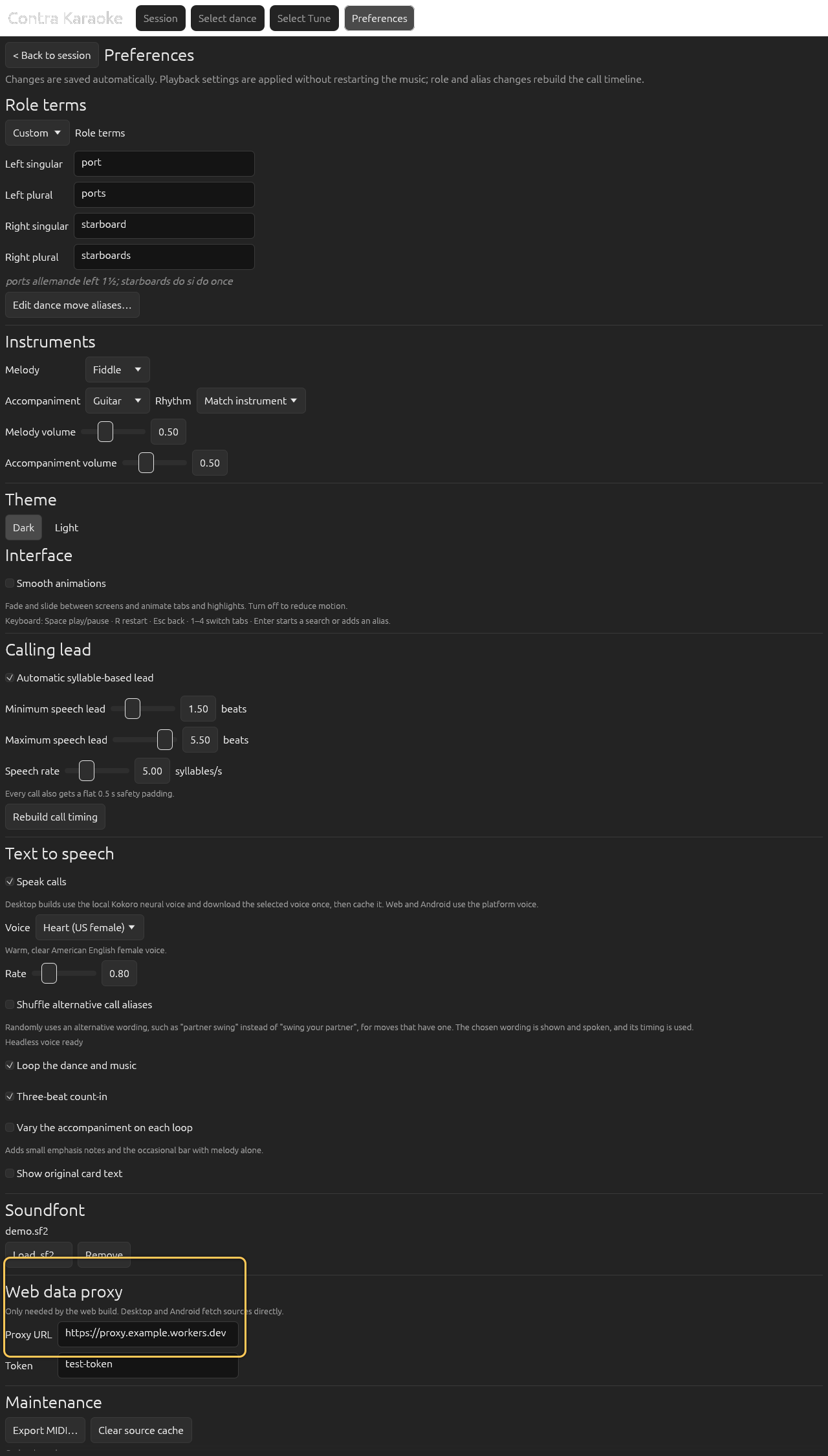
Desktop and Android fetch sources directly; the web build can use a proxy.
Without a proxy, the app still opens and uses the bundled defaults or cached content. Online search will fail.
What is stored in the browser
- Preferences are stored in
localStorageundercaller-karaoke.prefs. - Source responses are stored under keys beginning
caller-karaoke.cache.. - Clearing Preferences → Data & Storage → Clear source cache removes cached source responses; it does not clear your preferences.
- Reloading the page keeps both. Clearing site data removes both.
Browser limits
- Audio starts only after Play.
- The web build cannot load a SoundFont from a file in 0.1.0; it plays the bundled Fluid R3 GM subset.
- MIDI export is not available in the web build yet; the app reports that when you select Export MIDI….
- TTS depends on the browser's installed voices. If none are available, the visual calls still work.
- Search requires the proxy. The bundled defaults and cached content do not.
Keyboard shortcuts
Space plays or pauses, R restarts, Esc returns to the session from a picker or Preferences, 1–4 switch tabs, 5 opens Preferences, and Enter submits a search or adds a custom alias. Shortcuts are ignored while a text field has focus. See Keyboard shortcuts.
Next: Your first session.