How calls are timed
This page is the reference behind Timing and lead. It uses the same definitions as the application code.
Dance beats, bars, and tempo
A dance beat is the unit on a ContraDB card. It is half a bar in 4/4, 2/2, and 6/8. A standard 32-bar tune is 64 dance beats.
seconds_per_dance_beat = 120 / bpm
At the default 240 BPM:
- one dance beat = 0.5 s;
- a 64-beat dance = 32 s;
- a jig bar = 1.0 s.
The formula keeps reels and jigs equally danceable at the same BPM setting.
bpm is the quarter-note pulse for reels, not the dance beat itself.
The lead formula
For a rendered call:
syllables      = estimated syllables in the rendered alias
words          = word count
speech_seconds = syllables / syllables_per_second
               + (words - 1) × word_gap_seconds
               + extra_pause_seconds
speech_lead_beats = clamp(
                      (speech_seconds / seconds_per_dance_beat) × lead_scale,
                      min_lead_beats,
                      max_lead_beats
                    )
lead_beats = ceil(speech_lead_beats + safety_padding_seconds (converted to dance beats))
call_start_beat = execute_beat - lead_beats
The automatic lead — the speech estimate plus the safety padding — is rounded up to the next whole dance beat. The caller therefore gets at least the time the words need, and the call starts on a beat boundary rather than part of one. A manual lead is used exactly as entered.
Defaults:
| Setting | Default | Exposed in UI? |
|---|---|---|
| syllables per second | 4.0 | Yes, Speech rate |
| word gap | 0.0 s | No |
| extra pause | 0.0 s | No |
| lead scale | 1.0 | No |
| minimum speech lead | 1.0 beat | Yes |
| maximum speech lead | 5.0 beats | Yes |
| automatic-lead rounding | up to the next whole beat | No |
| manual lead | 1.5 beats | Yes, when automatic is off |
| safety padding | 0.5 s | Yes, Safety padding |
The maximum speech lead can be raised to 6.0 beats for learning sessions or slower TTS voices. Every call adds the safety padding after the clamp. It defaults to 0.5 s and can be set from 0 to 2 s; zero removes the buffer. The defaults are calibrated from a measured 2.25 s delivery of the nine-syllable call “larks allemande left once and a half”, which is 4.5 beats of speech plus 1 beat of padding at 240 BPM, rounded up to 6.
Worked examples at 240 BPM
| Call | Speech estimate | Total lead | Call starts |
|---|---|---|---|
swing | 1.0 beat | 2.0 beats | 1.0 s before the move |
circle left three | 2.0 beats | 3.0 beats | 1.5 s before the move |
neighbors do-si-do | 2.5 beats | 4.0 beats | 2.0 s before the move |
larks allemande left once and a half | 4.5 beats | 6.0 beats | 3.0 s before the move |
These values are illustrative and depend on the current alias text. The
application computes the real values from the rendered words. A count of one is
omitted, so neighbors do-si-do once is called as neighbors do-si-do and gets
the shorter lead shown.
Syllable estimation
The estimator is deliberately approximate:
- lowercase the text and strip punctuation;
- count vowel groups per word;
- subtract a silent trailing
ewhere appropriate; - use at least one syllable per word.
The alias is the caller's control surface. If the estimate feels wrong, change the alias or switch to a manual lead.
When Shuffle alternative call aliases is on, the app selects one usable wording for each figure and uses that text for both display and lead timing. The shuffle seed is stable for a session, so the same card produces the same calls until the dance or shuffle setting changes.
The first call is allowed to be negative
A call is placed before its execute beat. For the first figure, that means the call start can be before beat 0:
first execute beat = 0
first speech lead  = 2.5 beats
first padding      = 1 beat (default 0.5 s at 240 BPM)
first total lead   = ceil(3.5) = 4 beats
first call start   = -4 beats
With the four-beat count-in, that call begins at the start of the count-in. The count-in is not a clamp. The app shows and speaks the first call during the count-in when necessary. Do not "fix" this by starting the call at beat 0; that would make the first figure late.
The transport cannot always reach the start of that lead: a lead can be longer than the four-beat count-in, and the count-in can be turned off. When playback starts at or after the first call's execute beat, TTS still speaks the first call as soon as the run starts (during the count-in, or at beat 0 without one). It is announced once per run; resuming a paused dance does not repeat it.
Sub-calls
A figure can produce more than one call when its text has an explicit separator:
- semicolon (
;); - spaced dash (
-,–, or—).
balance & swing stays a single call. When a row is split, the row's beats are
allocated across the parts; a trailing balance gets about two beats when they
fit, otherwise the parts are split evenly.
Calls must stay ordered
Calls are sorted by call start beat, then by execute beat. The application does not reorder figures to hide an overlap. It also does not yet shorten a call automatically when two calls crowd each other; for now the answer is a shorter alias, a lower maximum speech lead, or a slower tempo. Time-aware call variants and collision-free scheduling are planned for a future release.
The 64-beat grid
The music loop is always 64 dance beats. The card does not have to total 64:
| Card total | Behavior |
|---|---|
| 64 | Matches one music loop exactly. |
| Less than 64 | Music continues after the last call; no further calls. |
| More than 64 | Music restarts at beat 0; figures after beat 64 are not reached in 0.1.0. |
| 32 or less | Music continues after the last call; the card does not repeat. |
The session shows the card total and a length check warning when the dance and tune body lengths differ. Calls use the card's cumulative figure beats; the music keeps the 64-beat grid.
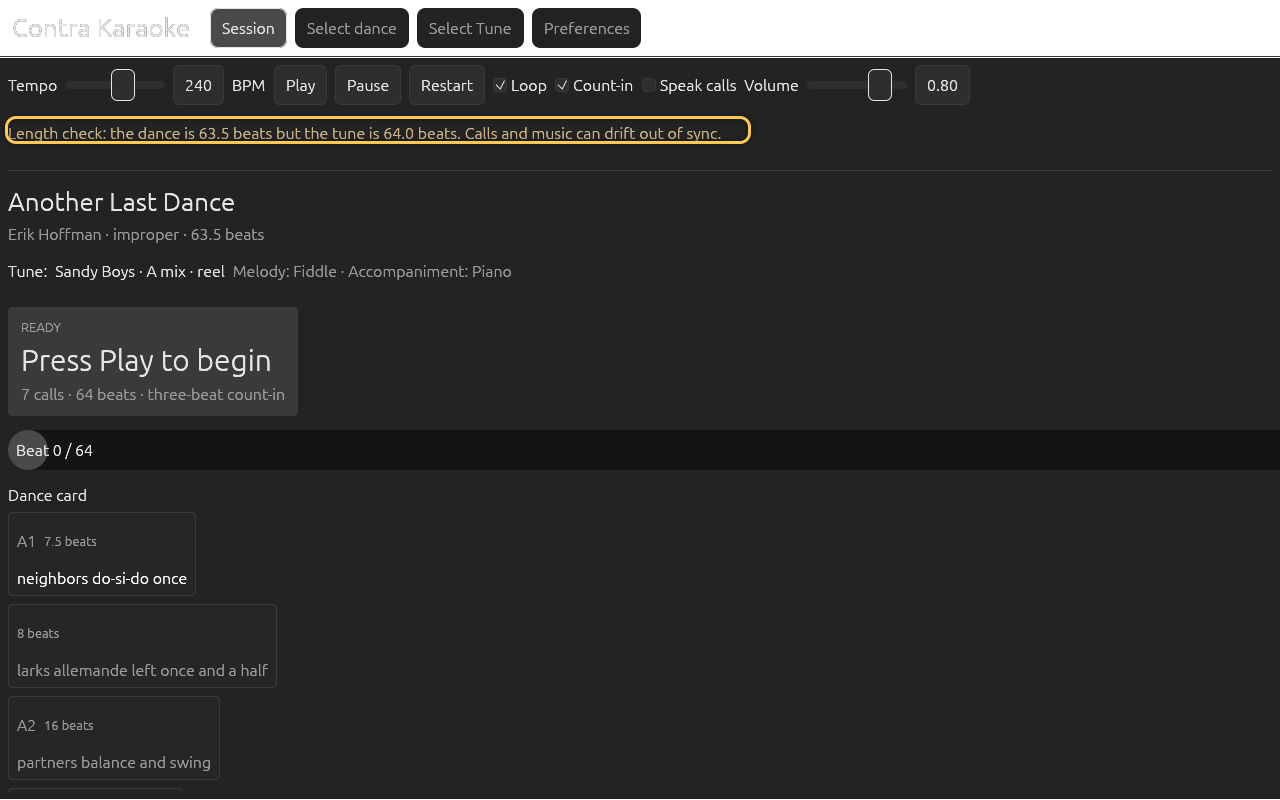
What the session shows
The dance card prints each figure's call lead in the top-right corner as
call N beats, so a caller can see how early each move starts before the
dance runs. While a figure executes, the upcoming-move card counts down with
call in N beats, and the executes in N beats line under the current call
is the same remaining lead. Both live countdowns are rounded to the nearest half
beat and always show one decimal (4.0, 3.5) so they do not flicker through
tenths.
TTS timing
When spoken calls are enabled, the app speaks the rendered alias when the call becomes active. It does not queue calls that were missed while paused. The visual prompt remains the authoritative timing cue.
Next: Data sources.